Layers
Layers
Type name: layers
Layers contracts enforce a 'layered architecture', where higher layers may depend on lower layers, but not the other way around.
Configuration options
layers: An ordered list with the name of each layer module. Ifcontainersare specified too, then these names must be relative to the container. The order is from higher to lower level layers. Layers wrapped in parentheses (e.g.(foo)) will be ignored if they are not present in the file system; otherwise, the contract will fail. It's also possible to include multiple layer modules on the same line, separated by either exclusively pipes (|) or exclusively colons (:) - see Multi-item layers. Does not support wildcards.containers: List of the parent modules of the layers, as absolute names that you could import, such asmypackage.foo. See Containers. Supports wildcards. (Optional.)ignore_imports: See shared options.unmatched_ignore_imports_alerting: See shared options.exhaustive. If true, check that the contract declares every possible layer in its list of layers to check. See Exhaustive contracts. (Optional, default False.)exhaustive_ignores. A list of layers to ignore in exhaustiveness checks. (Optional.)
Basic usage
'Layers' is a software architecture pattern in which a list of modules/packages have a dependency direction from high to low.
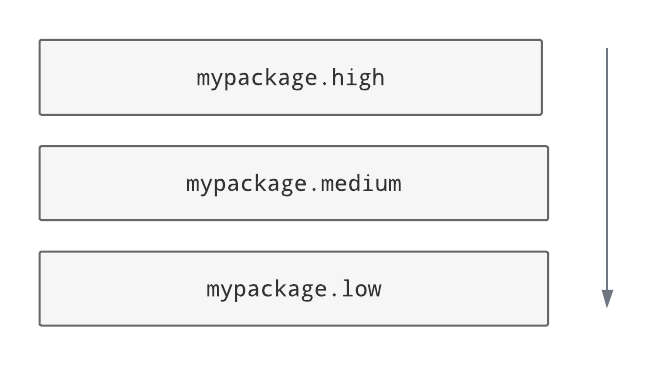
In this diagram, the Python package mypackage has a layered architecture in which its subpackage high is the
highest layer and its subpackage low is the lowest layer. low is not allowed to import from any of the layers
above it, while high can import from everything. In the middle, medium can import from low but not high.
This includes indirect imports (i.e. chains of imports via other modules), so if there was a module not listed here that
imports high (say, utils) then low wouldn't be allowed to import that either.
The architecture is enforced for all modules within the layers, too, so mypackage.low.one would not be
allowed to import from mypackage.high.two. That said, the layers don't have to be subpackages - they could just be
individual .py modules.
Here's how the architecture shown above could be checked using a layers contract:
[importlinter:contract:my-layers-contract]
name = My layers contract
type = layers
layers =
    mypackage.high
    mypackage.medium
    mypackage.low
[[tool.importlinter.contracts]]
name = "My layers contract"
type = "layers"
layers = [
    "mypackage.high",
    "mypackage.medium",
    "mypackage.low",
]
If a layer is listed in the contract, the contract will be broken if the layer doesn't exist. You can make a layer optional by wrapping it in parentheses, but this is only likely to be useful if you are using containers.
Layering across root packages
Layers don't have to be subpackages - they can be top-level (root) packages. We can still layer a Python project
consisting of three packages high, medium and low, in a directory that does not contain an
__init__.py file:
[importlinter]
root_packages=
    high
    medium
    low

[importlinter:contract:my-layers-contract]
name = My three-tier layers contract (multiple root packages)
type = layers
layers =
    high
    medium
    low
[tool.importlinter]
root_packages = [
    "high",
    "medium",
    "low",
]

[[tool.importlinter.contracts]]
name = "My three-tier layers contract (multiple root packages)"
type = "layers"
layers = [
    "high",
    "medium",
    "low",
]
In this contract, each top level package is treated as a layer. (Note, though, that they all need to be specified
as root_packages in the [importlinter] configuration, too.)
Containers
Containers allow for a less repetitive way of specifying layers.
Here's a contract that layers mypackage.high, mypackage.medium and mypackage.low using a single container:
[importlinter:contract:my-layers-contract]
name = My layers contract
type = layers
layers =
    high
    medium
    low
containers =
    mypackage
[[tool.importlinter.contracts]]
name = "My layers contract"
type = "layers"
layers = [
    "high",
    "medium",
    "low",
]
containers = [
    "mypackage",
]
Note that by using a container, we don't need to repeat the containing package in the layers section.
Containers are particularly useful if you want to specify a recurring pattern of layers in different places in the graph:
[importlinter:contract:my-layers-contract]
name = My multiple package layers contract
type = layers
layers =
    high
    (medium)
    low
containers =
    mypackage.foo
    mypackage.bar
    mypackage.baz
[[tool.importlinter.contracts]]
name = "My multiple package layers contract"
type = "layers"
layers = [
    "high",
    "(medium)",
    "low",
]
containers = [
    "mypackage.foo",
    "mypackage.bar",
    "mypackage.baz",
]
In this example, each container has its own layered architecture. For example, it will not allow mypackage.foo.low
to import mypackage.foo.high. However, it will allow mypackage.foo.low to import mypackage.bar.high,
as they are in different containers:
Notice that medium is wrapped in parentheses, making it an optional layer. This means that if it is missing from any of
the containers, Import Linter won't complain.
Exhaustive contracts
If you want to make sure that every module in each container is defined as a layer, you can mark the contract as
'exhaustive'. This means that if a module is added to the code base in the same package as your layers, the contract
will fail. Any such modules that shouldn't cause a failure can be added to an exhaustive_ignores list.
[importlinter:contract:my-layers-contract]
name = My multiple package layers contract
type = layers
layers =
  high
  (medium)
  low
containers=
  mypackage.foo
  mypackage.bar
  mypackage.baz
exhaustive = true
exhaustive_ignores =
  utils
[[tool.importlinter.contracts]]
name = "My multiple package layers contract"
type = "layers"
layers = [
    "high",
    "(medium)",
    "low",
]
containers = [
    "mypackage.foo",
    "mypackage.bar",
    "mypackage.baz",
]
exhaustive = true
exhaustive_ignores = [
    "utils",
]
If, say, a module existed called mypackage.foo.extra, the contract will fail as it is not listed as a layer. However
mypackage.foo.utils would be allowed as it is listed in exhaustive_ignores.
Exhaustive contracts are only supported for layers that define containers.
Multi-item layers
Import Linter supports the presence of multiple sibling modules or packages within the same layer. In the diagram below,
the modules blue, green and yellow are 'independent' in the same layer. This means that, in addition to not
being allowed to import from layers above them, they are not allowed to import from each other.
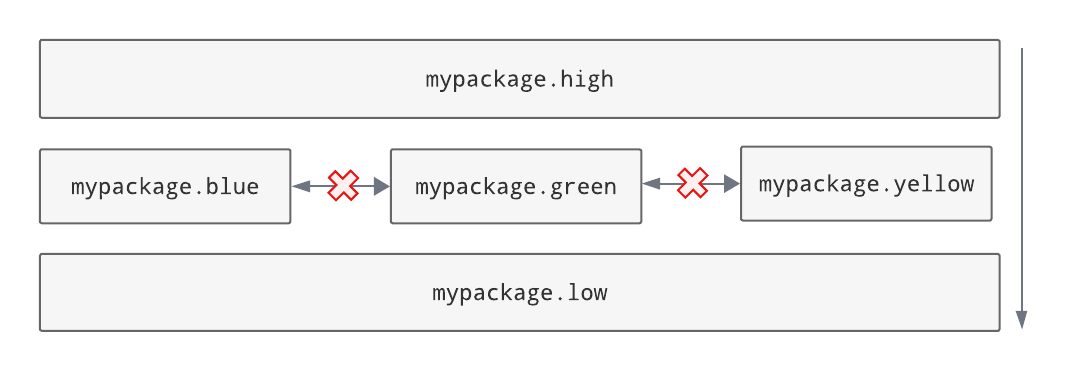
An architecture like this can be checked by listing the siblings on the same line, separated by pipe characters:
[importlinter:contract:my-layers-contract]
name = Contract with sibling modules (independent)
type = layers
layers =
  mypackage.high
  mypackage.blue | mypackage.green | mypackage.yellow
  mypackage.low
[[tool.importlinter.contracts]]
name = "Contract with sibling modules (independent)"
type = "layers"
layers = [
    "mypackage.high",
    "mypackage.blue | mypackage.green | mypackage.yellow",
    "mypackage.low",
]
For a more relaxed architecture siblings can be designated as non-independent, meaning that they are allowed to import from each other, as shown:
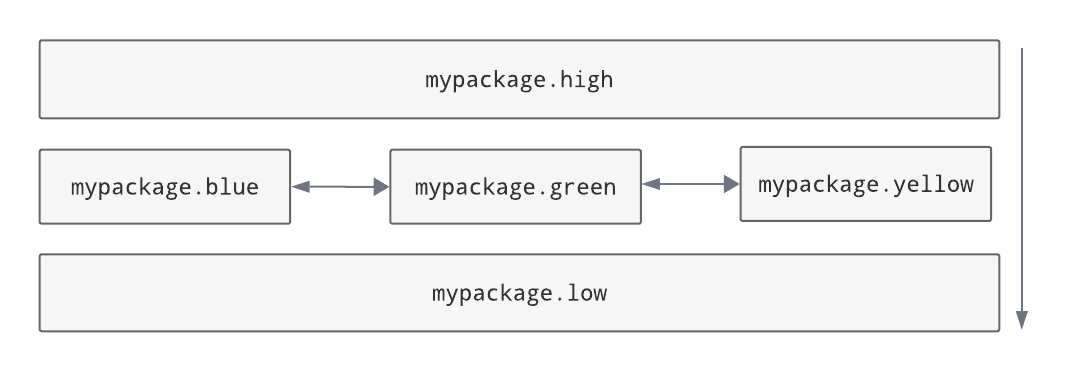
To allow siblings to depend on each other, use colons instead of pipes to separate them:
[importlinter:contract:my-layers-contract]
name = Contract with sibling modules (independent)
type = layers
layers =
  mypackage.high
  mypackage.blue : mypackage.green : mypackage.yellow
  mypackage.low
[[tool.importlinter.contracts]]
name = "Contract with sibling modules (independent)"
type = "layers"
layers = [
    "mypackage.high",
    "mypackage.blue : mypackage.green : mypackage.yellow",
    "mypackage.low",
]
Note: you are not allowed to mix different kinds of separators on the same line. This would be an invalid contract:
[importlinter:contract:my-invalid-contract]
name = Invalid contract
type = layers
layers =
  mypackage.high
  # The line below is invalid, as it mixes separators.
  mypackage.blue | mypackage.green : mypackage.yellow
  mypackage.low
[[tool.importlinter.contracts]]
name = "Invalid contract"
type = "layers"
layers = [
    "mypackage.high",
    # The line below is invalid, as it mixes separators.
    "mypackage.blue | mypackage.green : mypackage.yellow",
    "mypackage.low",
]